
Containers & Kubernetes Engine
Cloud containers and Kubernetes are pivotal technologies in modern cloud computing, enabling efficient application deployment, scalability, and management.
This document outlines what cloud containers and Kubernetes are, their benefits, and how the Nobus Support Team can assist customers in setting them up.
Cloud containers and Kubernetes provide powerful solutions for modern application deployment and management. Nobus offers managed services for ease of use, and provides Technical Support for customers who wish to set up and configure Kubernetes by themselves.
With this flexibility, organizations can choose the approach that best fits their needs, ensuring efficient and effective cloud resource management.
Architecture Guidance
Our internal architecture team is available to help you design robust containerized workflows that maximize the performance of Nobus Managed Kubernetes.
Nobus Cloud Containers
Cloud containers are lightweight, portable units that package an application and its dependencies together. This ensures that the application runs consistently across different computing environments.
Benefits
Portability:
Containers can run on any system that supports the container runtime, regardless of the underlying infrastructure.Isolation:
Each container runs in its isolated environment, preventing conflicts between applications.Scalability:
Containers can be easily scaled up or down based on demand.
Use Cases for Nobus Cloud Containers
1. Microservices Architecture
Deploy applications as a collection of loosely coupled services, each running in its container. This enhances scalability and maintainability, allowing teams to develop, deploy, and scale services independently.
2. DevOps and Continuous Integration/Continuous Deployment (CI/CD)
Use containers to automate the build, test, and deployment processes. This streamlines workflows and reduces the time from development to production, leading to faster release cycles.
3. Hybrid Cloud Deployments
Run applications across public and private clouds using the same containerized environment. This provides flexibility in resource allocation and helps optimize costs while maintaining control over critical applications.
4. Development and Testing Environments
Create isolated environments for development and testing using containers. This ensures consistency across different stages of development and simplifies the setup of testing environments.
5. Application Modernization
Refactor legacy applications into containerized microservices. This increases agility and allows for easier updates and scaling of applications without major overhauls.
6. Serverless Architectures
Use containers to run serverless functions that respond to events. This reduces operational overhead while enabling quick response times and efficient resource usage.
7. Data Processing and Analytics
Deploy containers for data processing tasks, such as ETL (Extract, Transform, Load) jobs. This facilitates scalable and efficient data processing workflows, allowing for rapid analysis and reporting.
10. Security and Compliance
Isolate applications in containers to enhance security and meet compliance requirements. This reduces the attack surface and simplifies compliance audits by providing clear boundaries between applications.
Contact our cloud support team to get started with setting up cloud containers.
Nobus Kubernetes Engine
Kubernetes is an open-source container orchestration platform that automates the deployment, scaling, and management of containerized applications.
Kubernetes (often shortened to "K8s"), runs your applications as containers across a group of servers, and keeps them healthy automatically. Instead of logging into individual servers and starting programs by hand, you tell Kubernetes what you want running and it figures out where to place the work, restarts anything that crashes, and spreads traffic evenly.
Think of it like a fleet manager for your software: you describe the desired state ("I want 3 copies of my web app"), and Kubernetes makes it true and keeps it true.
Benefits of Nobus Kubernetes Engine
Automated Deployment:
Simplifies the process of deploying applications by automating many tasks.Scaling and Load Balancing:
Automatically scales applications based on traffic and distributes workloads effectively.Self-Healing:
Automatically replaces failed containers and reschedules them to ensure high availability.Declarative Configuration:
Uses configuration files to define the desired state of applications, making it easier to manage changes.
User Guide — Creating, Running, and Scaling Your Clusters
This guide explains what Kubernetes is, the building blocks Nobus provides, and how to use the Nobus console to create a cluster, manage it day-to-day, monitor it, and grow it as your workload changes. It is written for all users — no programming or infrastructure background required.
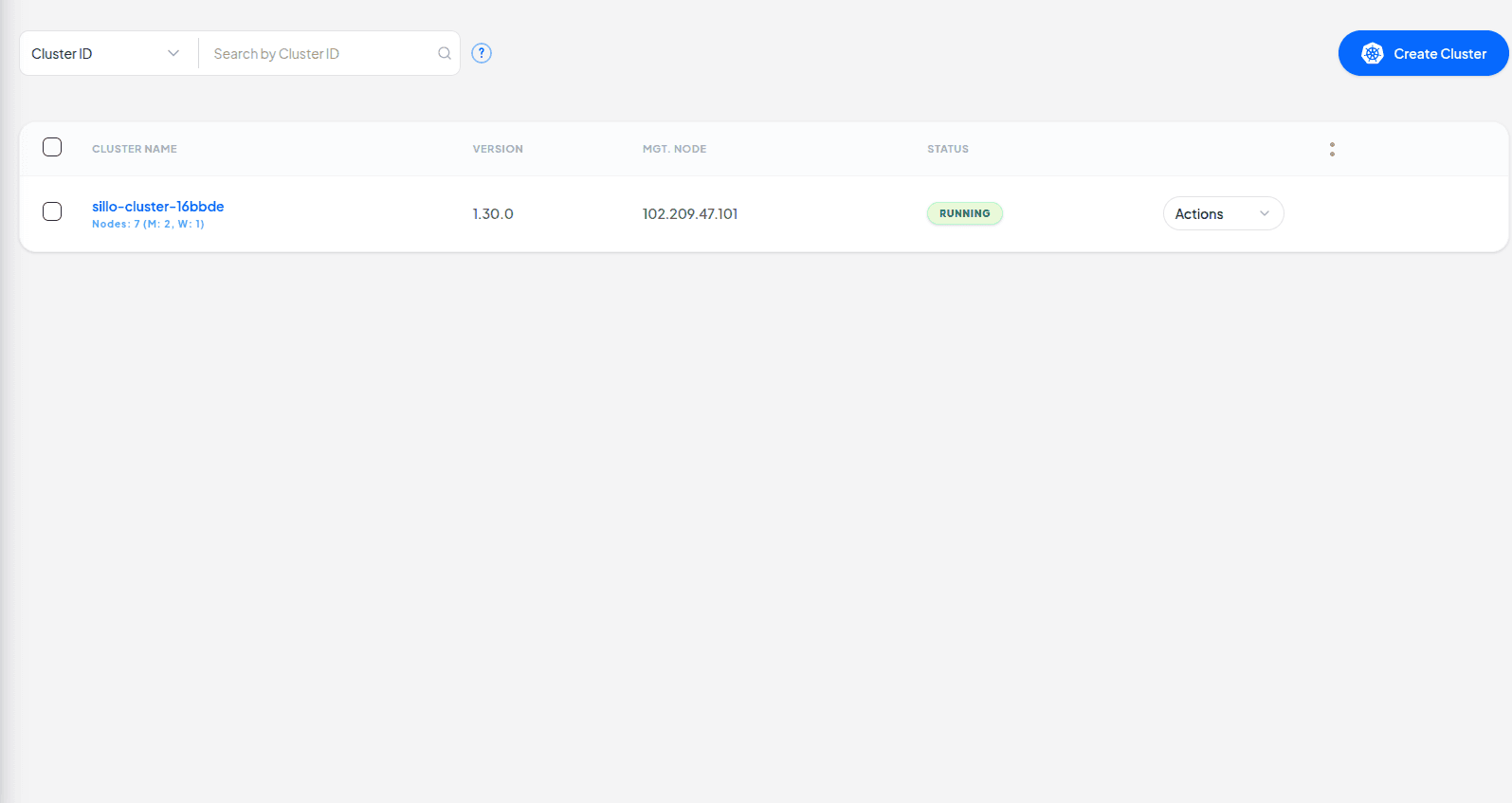
1. Key Concepts
Cluster
The whole group of servers managed together as one unit. Everything lives inside a cluster.
Node
A single server (virtual machine) inside the cluster. Your apps run on nodes.
Control Plane (Masters)
The 'brain' nodes that make decisions — scheduling, health checking, and API access.
Worker Node
A 'muscle' node where your actual application containers run.
Pod
The smallest deployable unit — usually one running copy of part of your app.
High Availability (HA)
Running multiple control-plane nodes so the cluster keeps working even if one fails.
Load Balancer
A node that spreads incoming user traffic across your servers so no single one is overwhelmed.
Bastion Host
A secure 'jump box' you connect through to reach the private cluster nodes safely.
NFS Server
Shared storage that many nodes can read/write at the same time.
Instance Spec
The size of a machine — how many CPUs and how much memory it has.
2. Before You Start
You will need a few things ready before creating a cluster:
- Your Project ID and the region (availability zone) where the cluster should live.
- A Router in that project that already has an internet gateway.
- The Machine sizes (specs) you want for masters and workers.
- A Kubernetes version (defaults to recent stable release if blank).
Production Minimums
A production cluster needs at least 2 control-plane (master) nodes for high availability, and the etcd storage volume must be at least 50 GB.
3. Creating Your First Cluster
| Field | What it means |
|---|---|
| Cluster Name | A friendly name to recognize this cluster later. |
| Project & Region | Where the cluster is created. |
| Version | Which K8s release to install (default is provided). |
| Router | The existing router the cluster attaches to for internet access. |
| Number of Masters | Control-plane nodes. Min 2 for HA. |
| Number of Workers | Worker nodes that run your apps. |
| etcd volume size | Storage for the cluster's state database. Min 50 GB. |
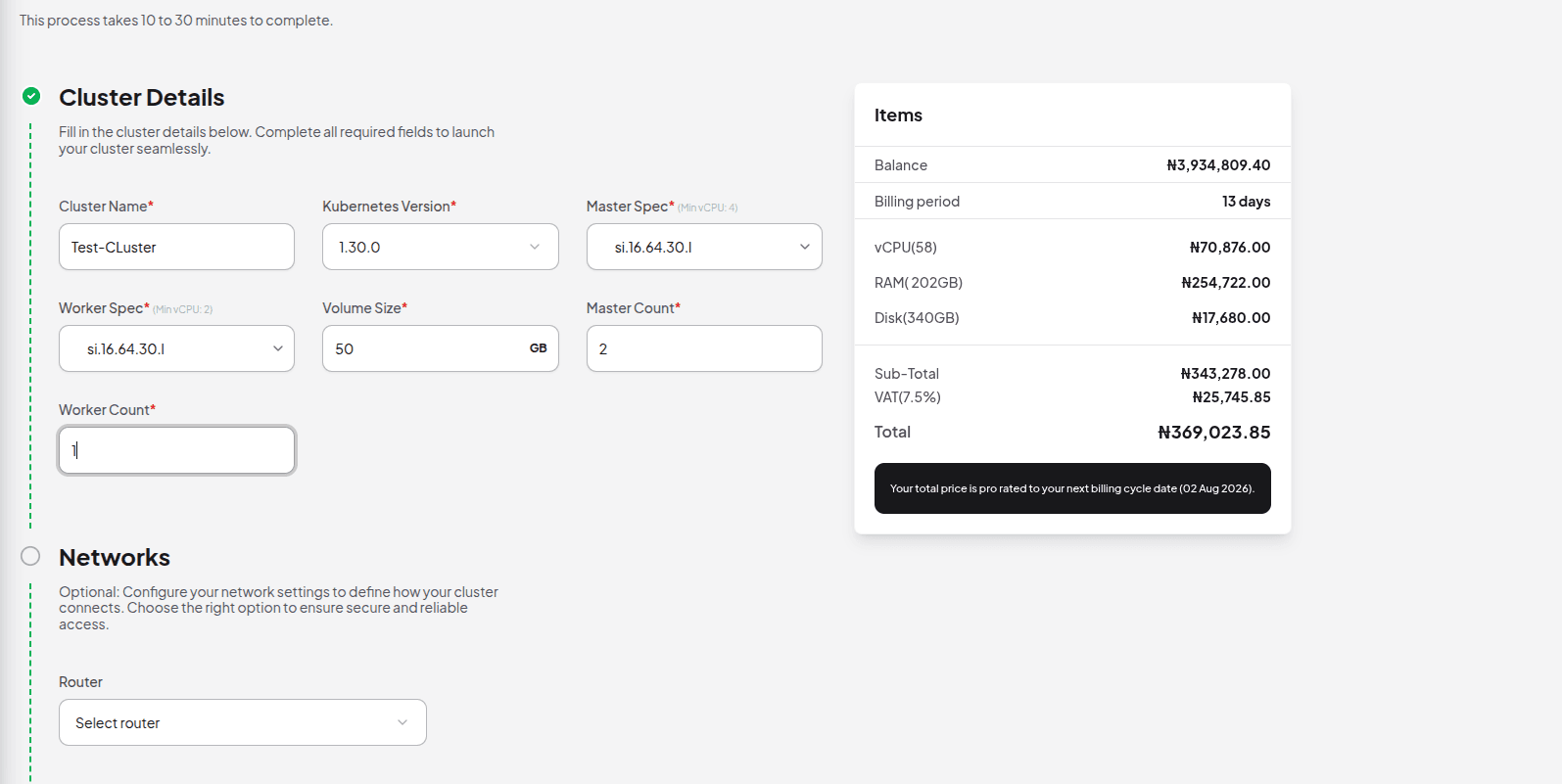
After you confirm, the console shows "Provisioning" and a task ID. The cluster typically takes several minutes to become "Running".
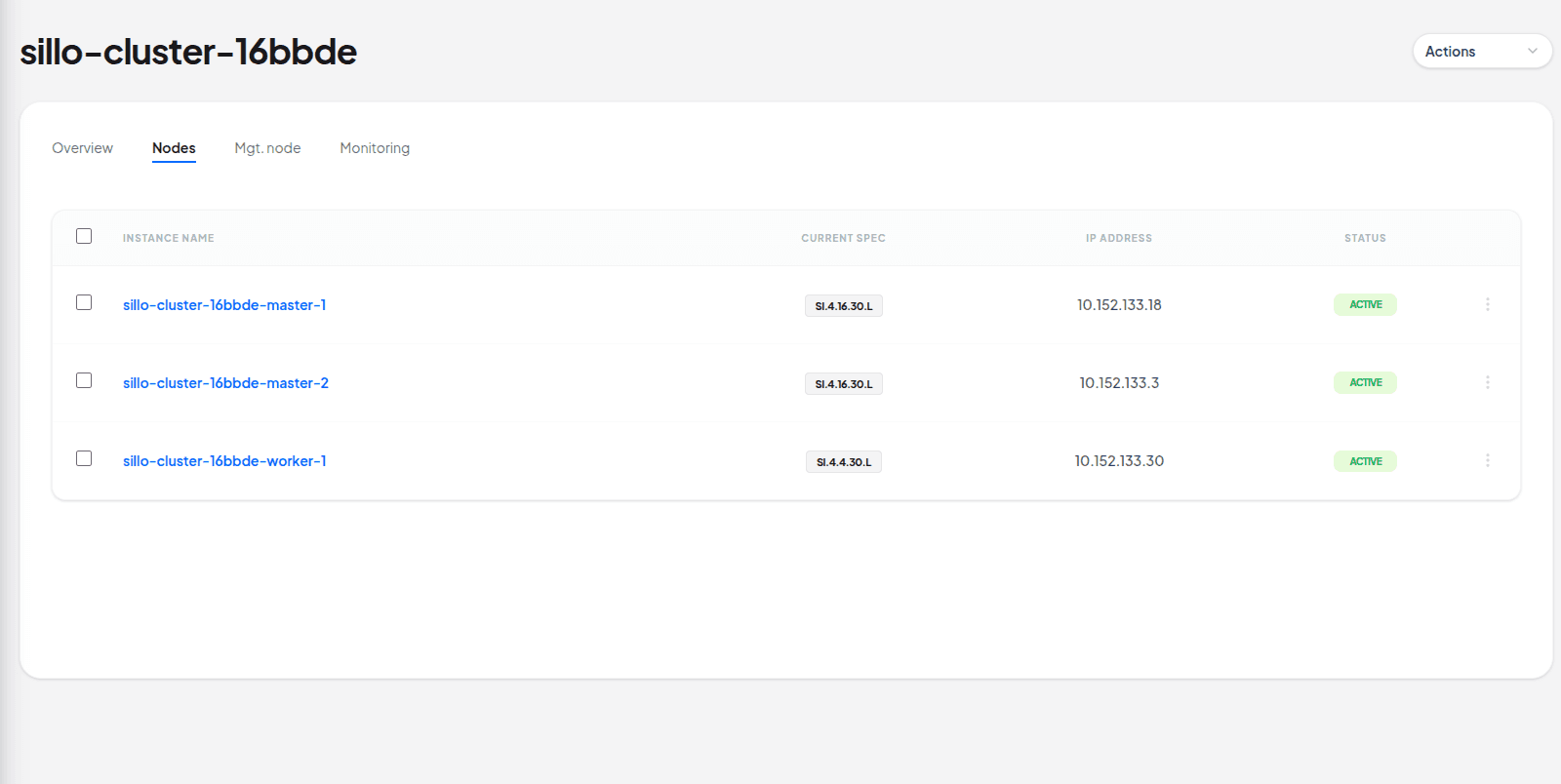
4. Managing Your Cluster
• Overview: See current status, version, node counts, and network info.
• Nodes: View every node, its role, IP, and health.
• Cluster Status:Check the provisioning or scaling task progress.
• Management Access: Get SSH/bastion credentials and monitoring login.
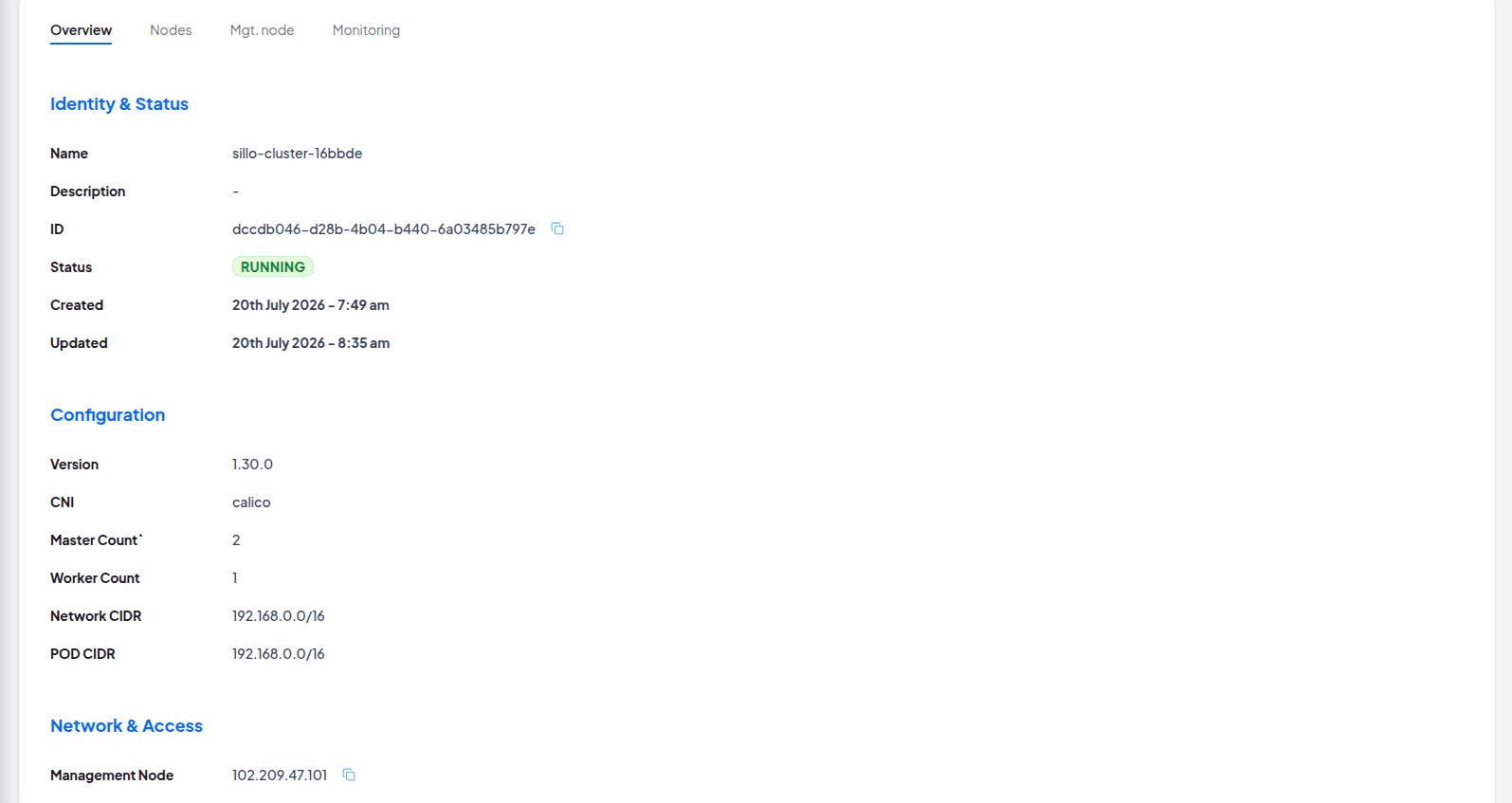
If something goes wrong during an operation, the status shows an error with a short message so you can retry
4a. Monitoring & Dashboards
Every cluster includes a Grafana dashboard showing live charts for CPU, memory, and node health. Open the Monitoring panel for the cluster to get the Grafana URL and password.
Where to find it: Go to the cluster's Monitoring section in the console to reveal your admin password.
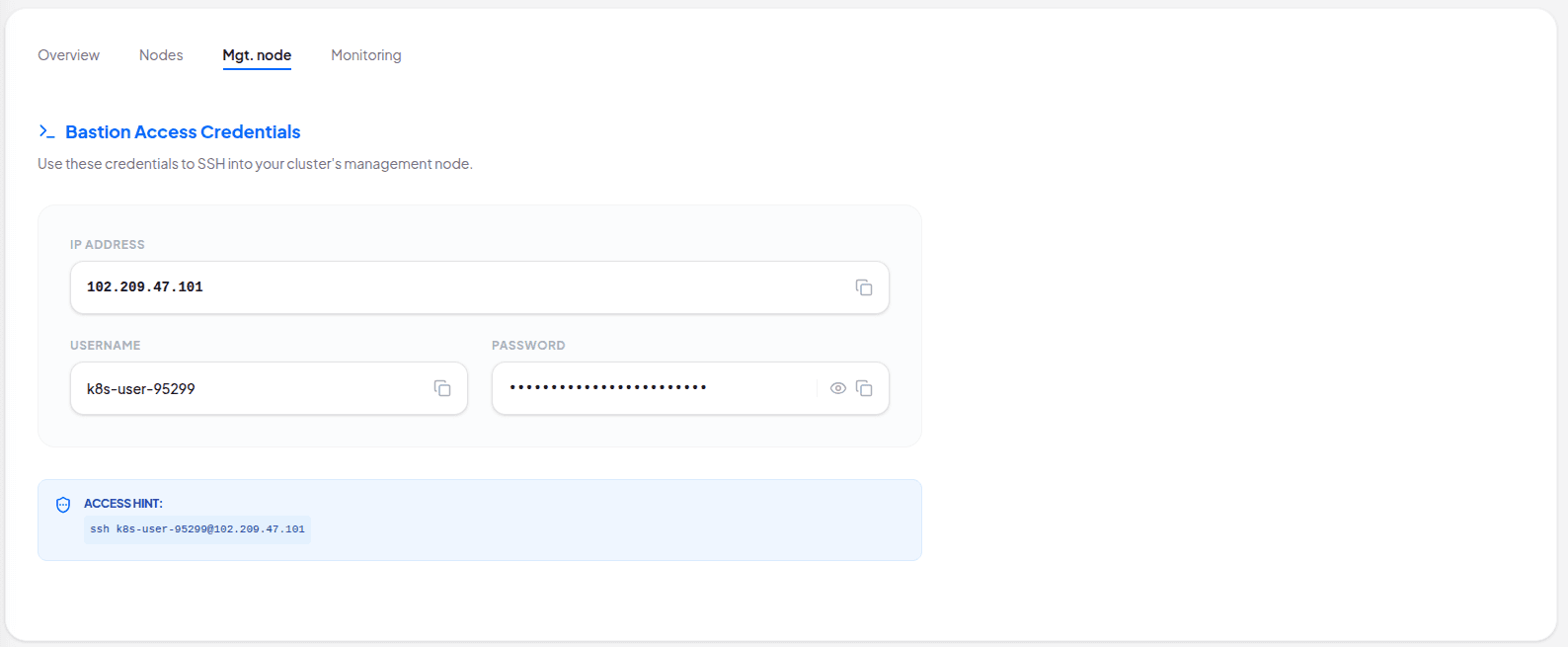
4b. Accessing Your Cluster (Bastion / SSH)
Cluster nodes are private for security. To reach them, you connect to the Bastion host first.
Kubernetes API: Your kubectl commands target the cluster's API VIP address shown in the cluster details, not an individual master node.
6. Scaling — Making Your Cluster Bigger or Smaller
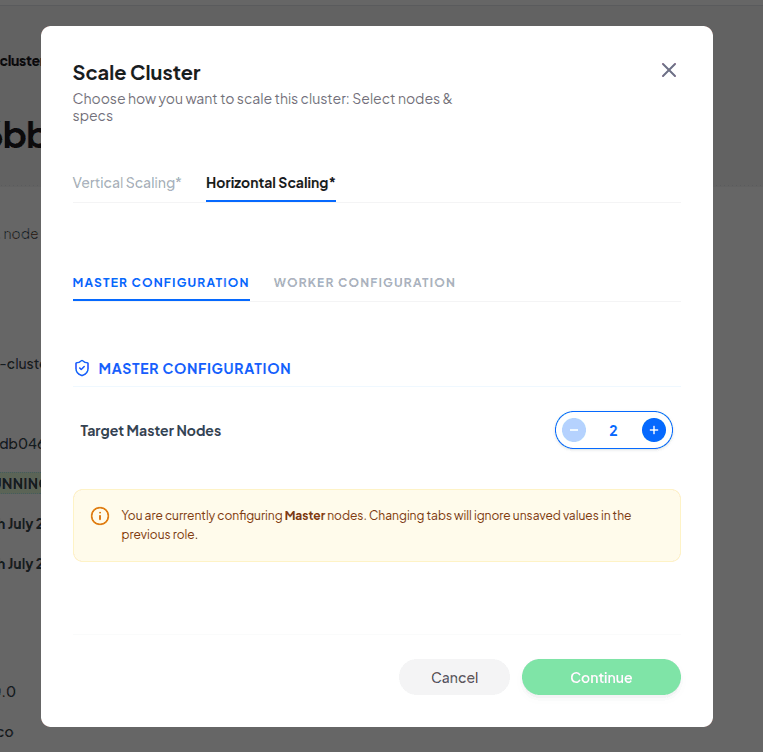
Horizontal Scaling
Add or remove whole nodes. Best for handling more users or increasing application replicas.
Vertical Scaling
Change node spec (CPU/RAM). Best when a single application requires more compute power.
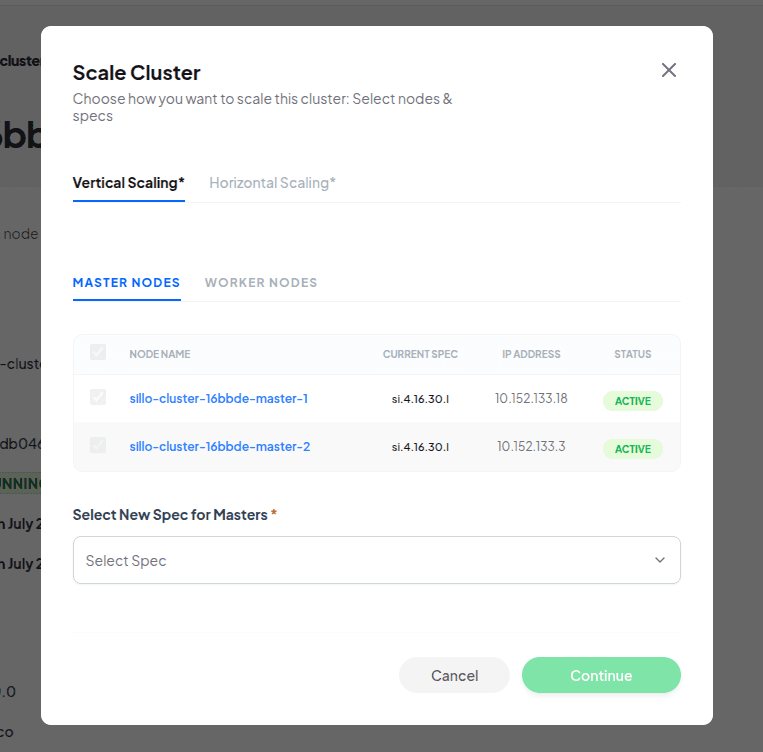
Vertical scaling resizes nodes one at a time. The cluster stays available, but individual nodes will briefly restart during the process.
7. Deleting a Cluster
Deletion removes all nodes, storage, networks, and security groups created for that cluster.
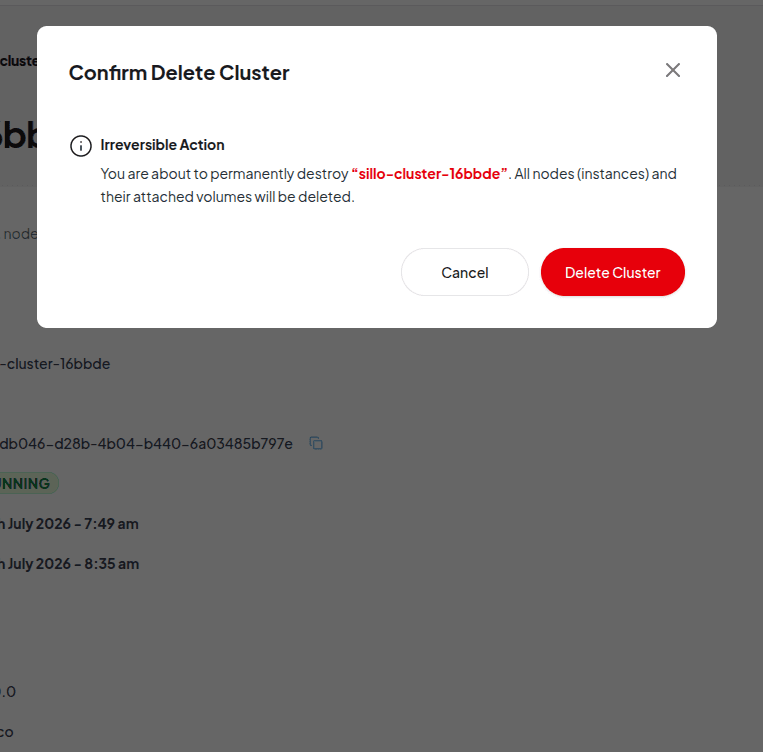
Router is kept: Deleting a cluster detaches its network from your router but does NOT delete the router itself.
Tips & FAQ
How long does provisioning take?
Usually several minutes. You can watch the status move from 'Provisioning' to 'Running' in the dashboard.
Can I change the number of masters later?
Yes, via horizontal scaling. Masters must always stay at 2 or more for cluster stability.
What if an operation fails?
The status will show an error message. Check your inputs (e.g. spec or router capacity) and retry.
Is my data kept when I vertically scale?
Yes. Nodes are resized in place and volumes are preserved.
Setting Up Kubernetes the Hard Way
For customers who prefer to set up their cluster manually, we can assist by offering extensive resources for setting up Kubernetes manually. This process generally involves:
Preparing the Environment:
Setting up your account.Provisioning Compute Resources:
Create virtual machines (VMs) that will serve as nodes in the Kubernetes cluster.Installing Kubernetes Components:
Install essential components such as kubeadm, kubelet, and kubectl on each node.Joining Worker Nodes:
Use the token generated during the control plane initialization to join worker nodes to the cluster.Configuring Networking:
Set up a container network interface (CNI) to enable communication between containers across nodes.Deploying Applications:
Use Kubernetes manifests (YAML files) to define and deploy applications to the cluster.Monitoring and Maintenance:
Implement monitoring solutions and establish maintenance routines to keep the cluster healthy.
See Kubernetes The Hard Way for guide to bootstrapping a basic Kubernetes cluster with all control plane components running on a single node, and two worker nodes, which is enough to learn the core concepts if you prefer to set up your cluster manually.
Nobus Managed Service for Kafka
Apache Kafka is an open-source distributed event streaming platform designed for high-throughput, fault-tolerant, and real-time data processing.
It is a powerful tool for building real-time data pipelines and streaming applications, providing a robust framework for handling large volumes of data efficiently and reliably. Its ability to scale, persist data, and handle failures makes it a popular choice in modern data architecture.
Key Features
- High Throughput: Kafka is capable of handling a large volume of messages per second, making it suitable for high-traffic applications.
- Scalability: Kafka can be easily scaled horizontally by adding more brokers to a cluster, allowing it to handle increased load.
- Durability: Messages in Kafka are persisted on disk, providing durability and ensuring that data is not lost even in the event of failures.
- Fault Tolerance: Kafka is designed to be resilient to failures. It can replicate data across multiple brokers, ensuring that messages are available even if some brokers go down.
- Real-time Processing: Kafka supports real-time data processing by enabling applications to consume and process streams of records as they are produced.
Core Concepts
- Producer: An application that sends (produces) messages to a Kafka topic.
- Consumer: An application that reads (consumes) messages from a Kafka topic.
- Topic: A category or feed name to which records are published. Topics are partitioned for scalability and parallel processing.
- Partition: A division of a topic that allows Kafka to distribute the load. Each partition is an ordered, immutable sequence of records.
- Broker: A Kafka server that stores data and serves client requests. A Kafka cluster is made up of multiple brokers.
- Consumer Group: A group of consumers that work together to read messages from a topic. Each message is delivered to only one consumer within a group, allowing for load balancing.
- Offset: A unique identifier for each message within a partition, which allows consumers to keep track of their position in the stream.
Use Cases
- Real-time analytics: Processing and analyzing data streams in real time.
- Data integration: Connecting different data sources and sinks, such as databases and data warehouses.
- Log aggregation: Collecting and processing log data from various services.
- Event sourcing: Storing state changes as a sequence of events for later reconstruction.
Benefits of Running Kafka in the Cloud
Nobus Managed Kafka cluster offers several advantages that can enhance performance, scalability, and manageability.
1. Scalability
- Dynamic Resource Allocation: Cloud platforms allow you to scale your Kafka cluster up or down easily based on demand, without the need for significant hardware investment.
- Auto-Scaling: Many cloud providers offer auto-scaling features that automatically adjust resources based on traffic patterns.
2. Managed Services
- Ease of Management: Cloud providers often offer managed Kafka services (e.g., Amazon MSK, Confluent Cloud, Azure Event Hubs) that handle maintenance tasks, upgrades, and monitoring, reducing operational overhead.
- Faster Deployment: Setting up a Kafka cluster in the cloud can be done quickly with minimal configuration, allowing teams to focus on application development.
3. High Availability and Fault Tolerance
- Built-in Redundancy: Cloud services typically provide built-in redundancy and failover capabilities, ensuring high availability for your Kafka cluster.
- Geographic Distribution: Cloud platforms allow you to deploy Kafka across multiple regions or availability zones, enhancing fault tolerance and disaster recovery.
4. Cost Efficiency
- Pay-as-You-Go Pricing: You only pay for the resources you use, which can be more cost-effective than maintaining on-premises hardware.
- Reduced Capital Expenditure: By leveraging cloud infrastructure, organizations can avoid large upfront investments in hardware.
5. Security and Compliance
- Built-in Security Features: Cloud providers often include security features such as encryption, identity and access management, and network security.
- Compliance Support: Many cloud platforms comply with industry standards and regulations, which can simplify compliance for organizations.
6. Integration with Other Services
- Ecosystem: Cloud platforms offer a rich ecosystem of services (e.g., databases, analytics tools, machine learning services) that can easily integrate with Kafka, facilitating data workflows.
- Event-Driven Architectures: Running Kafka in the cloud can facilitate the development of event-driven architectures using various cloud-native services.
7. Monitoring and Analytics
- Advanced Monitoring Tools: Cloud platforms often provide integrated monitoring and logging tools that help you track the performance and health of your Kafka cluster.
- Data Analytics: You can easily connect your Kafka streams to analytics services for real-time data processing and insights.
Nobus Managed Kafka Service enhances scalability, manageability, and integration capabilities while reducing operational burdens and costs. This makes it an attractive option for organizations looking to leverage Kafka for real-time data processing and event streaming in a modern, flexible architecture.
See Apache Kafka Documentation to learn core concepts of Kafka.
Contact our cloud support team to get started with setting up kafka.